Remote Access Trojans: Definition, Mechanics, and Risk Reduction
Remote access trojans hide inside legitimate software to give attackers persistent control over your system without triggering standard antivirus alerts.

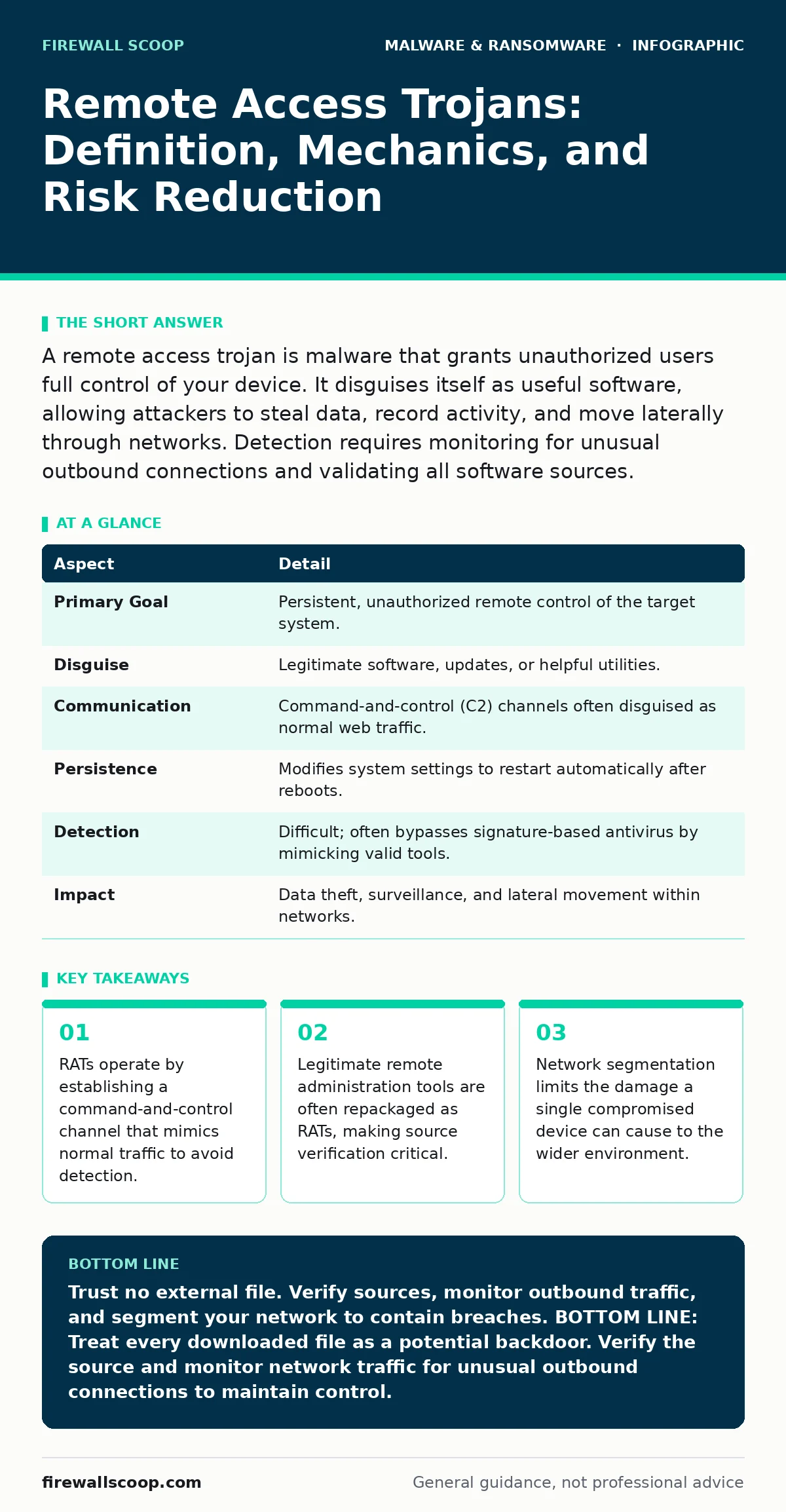
A remote access trojan is malware that grants unauthorized users full control of your device. It disguises itself as useful software, allowing attackers to steal data, record activity, and move laterally through networks. Detection requires monitoring for unusual outbound connections and validating all software sources.
The Trojan Horse Mechanism
Imagine you hire a contractor to fix your roof. You give them a key to the front door because you expect them to enter. Now imagine they keep that key and enter your home whenever they want, months later, without you knowing. A remote access trojan (RAT) works exactly like this kept key. It is a type of malware that disguises itself as legitimate software to gain persistent, unauthorized control over your computer.
Unlike viruses that replicate themselves or ransomware that locks your files, a RAT focuses on stealth and control. The attacker does not just want to break in once; they want to stay inside. They use the compromised system as a foothold to explore your network, steal credentials, or install additional malware. The name "trojan" refers to the Greek myth where soldiers hid inside a wooden horse. Similarly, the malware hides inside a seemingly harmless application.
| Aspect | Detail |
|---|---|
| Primary Goal | Persistent, unauthorized remote control of the target system. |
| Disguise | Legitimate software, updates, or helpful utilities. |
| Communication | Command-and-control (C2) channels often disguised as normal web traffic. |
| Persistence | Modifies system settings to restart automatically after reboots. |
| Detection | Difficult; often bypasses signature-based antivirus by mimicking valid tools. |
| Impact | Data theft, surveillance, and lateral movement within networks. |
How Infection Occurs
You do not usually get infected by clicking a flashy pop-up. RATs rely on trust. The most common delivery method is social engineering, where the attacker tricks you into installing the malware yourself. This might look like a software update for a program you already use. You see a notification saying your media player needs an update. You click it. The file downloads and installs. But instead of updating the player, it installs a backdoor.
Another method involves bundling. You download a free utility from a questionable website. The installer includes the free tool you wanted, but it also silently installs the RAT in the background. Because the installer runs with administrative privileges, the RAT can embed itself deep into the operating system. It modifies registry keys or creates new user accounts that are invisible to standard views.
Who Is at Risk
Anyone with an internet connection is a target, but the attack surface varies. Students and remote workers are frequent targets because they often use personal devices for work or school. These devices may lack the strict security controls found in corporate environments. If your laptop connects to both home Wi-Fi and a corporate network, a RAT on that laptop can serve as a bridge. The attacker can use your device to scan the corporate network, looking for vulnerabilities to exploit.
Small businesses are also vulnerable. They often lack dedicated security teams. An attacker may target a small vendor to reach a larger client. This is called supply chain compromise. By infecting the smaller company, the attacker gains a trusted pathway into the larger organization’s network. The assumption is that the larger company will trust data coming from its known vendors.
Common Forms and Capabilities
RATs come in many shapes, but they share core capabilities. Most include a keylogger, which records every keystroke you type. This captures passwords, messages, and sensitive data. Others include webcam access, allowing the attacker to watch and record video without activating the camera light. Some RATs can capture screen shots at intervals, giving the attacker a visual record of your activity.
Advanced RATs can execute commands remotely. The attacker can open terminals, download more files, or change system configurations. Some are modular, meaning the attacker can load new features on demand. This makes them harder to detect because the initial payload is small and benign. The dangerous modules are only downloaded when the attacker needs them.
A major challenge in detection is that many RATs are built from legitimate open-source remote administration tools. Administrators use these tools to help employees. Attackers repackage them, remove the user interface, and add malicious commands. To an antivirus program, the code looks identical to the legitimate tool. This is why signature-based detection often fails. You need to look at behavior, not just file names.
What People Usually Get Wrong
Many users believe that if their antivirus did not alert them, they are safe. This is incorrect. Modern RATs are designed to bypass signature checks. They may use polymorphism, changing their code slightly with each infection. This creates a new digital fingerprint every time, rendering old signatures useless. You cannot rely solely on automated scanning.
Another common misconception is that disabling remote desktop services prevents RATs. While this reduces the attack surface, it does not stop RATs that use custom protocols. A RAT does not need the standard remote desktop port. It can communicate over common ports like HTTP or HTTPS, blending in with normal web browsing. Blocking specific ports is not enough. You must monitor for unusual outbound connections, even on allowed ports.
See also: Drive-by Downloads: How Silent Infections Bypass Your Defenses · Are Password Managers Worth It? A Security Breakdown
Reducing the Risk
The most effective defense is application whitelisting. This security measure allows only approved applications to run. Any other program, even if you install it manually, is blocked. This stops RATs from executing, even if they are downloaded. It requires careful management of the whitelist, but it is far more effective than trying to block every possible threat.
Network segmentation limits the damage. Divide your network into zones. A device in the guest zone should not be able to talk to devices in the financial data zone. If a RAT infects a guest device, it cannot move laterally to critical systems. This containment strategy reduces the blast radius of an infection.
Regularly update your operating system and applications. Patch management fixes vulnerabilities that attackers use to install malware. If you delay updates, you leave known holes open for exploitation. Automate updates where possible to ensure consistency.
Detecting and Responding
Detection requires looking for anomalies. Monitor for unusual outbound traffic. If your computer is sending large amounts of data to an unknown server at 3 AM, it is suspicious. Use network monitoring tools to establish a baseline of normal traffic. Deviations from this baseline warrant investigation.
Check for unknown processes running in the background. Use task managers to view all active processes. Look for names that mimic system files but have slight variations. Check the file locations. Legitimate system files run from system directories. If a process named "svchost.exe" runs from the "Downloads" folder, it is malicious.
If you suspect an infection, disconnect the device from the network immediately. This cuts off the attacker’s control channel. Do not try to delete the file yourself. RATs often have multiple copies and persistence mechanisms. Use a dedicated incident response plan. For detailed steps on handling specific threats, see our guide on ransomware recovery plans for structural guidance, or removing malware from a Mac if you are on that platform. For deeper insights on data theft, review infostealers.
The Hidden Cost of Trust
The hardest part of defending against RATs is managing trust. You must verify every piece of software you install. This adds friction to your workflow. It takes time to check digital signatures and verify download sources. Many users skip this step for convenience. The trade-off is security.
Remember that golden images—pre-configured, clean copies of the operating system—can help. By deploying known-good images, you reduce the risk of pre-installed malware. This is especially useful for large deployments. For understanding the time required to restore systems, see recovery time objective. For threats that hide at the kernel level, see rootkits. For browser-based threats, see malicious browser extensions. And for the broader threat, see ransomware.
Key takeaways
- RATs operate by establishing a command-and-control channel that mimics normal traffic to avoid detection.
- Legitimate remote administration tools are often repackaged as RATs, making source verification critical.
- Network segmentation limits the damage a single compromised device can cause to the wider environment.
Trust no external file. Verify sources, monitor outbound traffic, and segment your network to contain breaches. BOTTOM LINE: Treat every downloaded file as a potential backdoor. Verify the source and monitor network traffic for unusual outbound connections to maintain control.
Frequently asked questions
Can a remote access trojan hide from antivirus software?
Yes, many RATs use techniques like code obfuscation or mimic legitimate tools to bypass signature-based detection. Behavioral analysis is often required to spot them.
How do I know if my computer has a remote access trojan?
Look for unexplained system slowdowns, unknown programs running in the background, or unusual network activity. Sudden battery drain on laptops can also be a sign.
Is it safe to use free remote desktop software?
It can be risky. Many RATs are repackaged versions of legitimate open-source remote desktop tools. Only use software from verified, official sources.
Can a firewall stop a remote access trojan?
A standard firewall blocks incoming connections but often allows outgoing ones. Since RATs initiate connections to attackers, firewalls may not block them without strict outbound rules.
How this guide was produced: written by the Firewall Scoop editorial team with AI assistance, checked against the public references listed below, and reviewed when the facts change. See our editorial policy or report an error.