Antivirus Quarantine: Small Business Recovery and Data Safety
Quarantine isolates threats but consumes storage and masks persistent malware that survives the containment process.
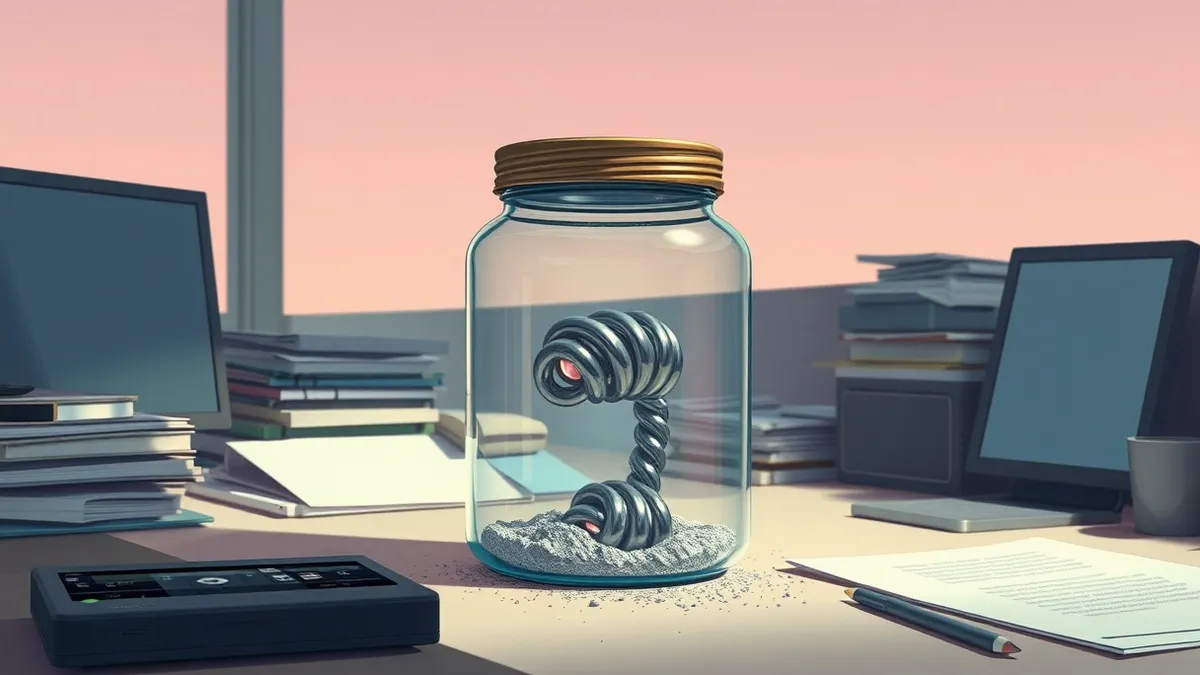
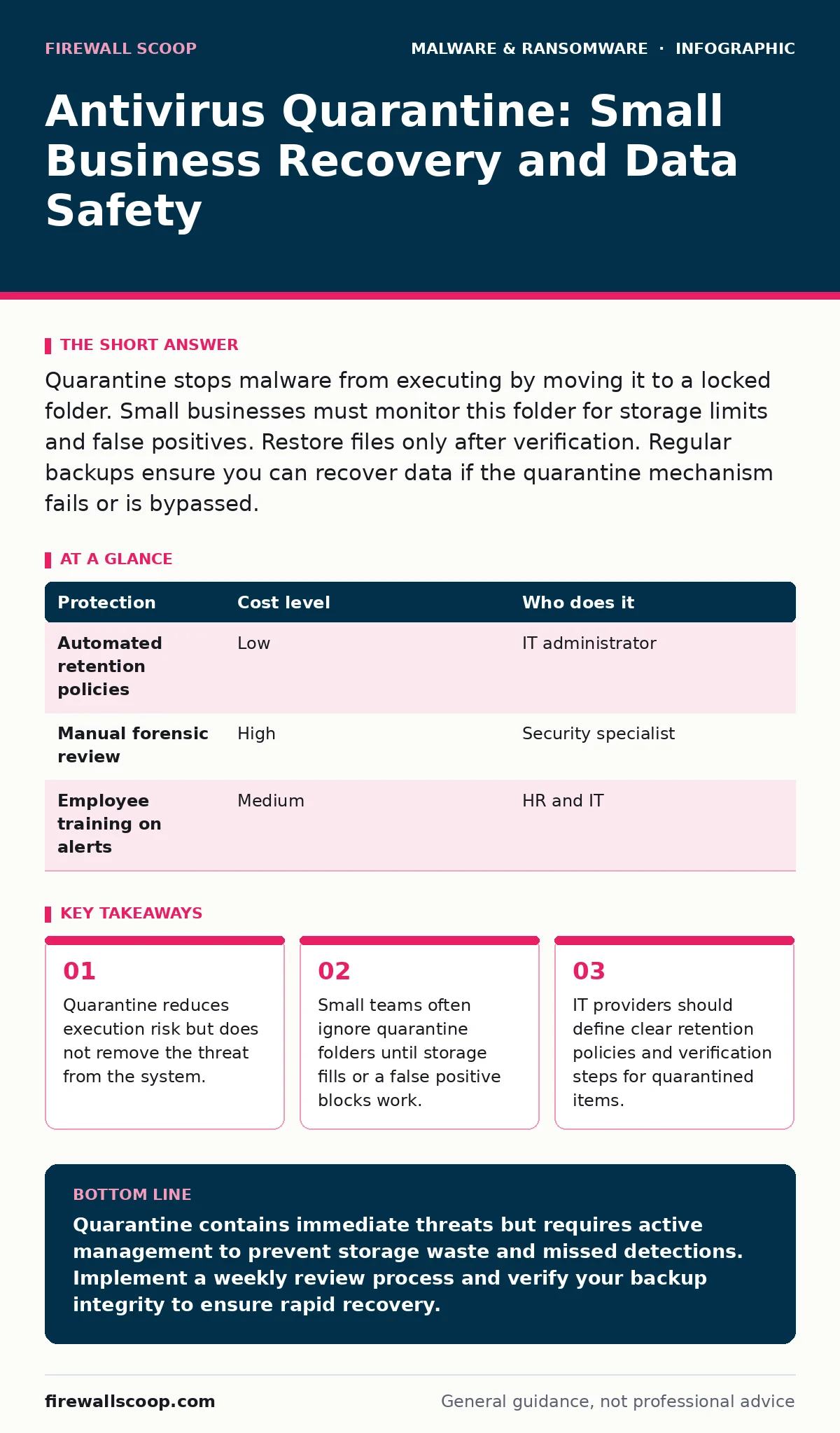
Quarantine stops malware from executing by moving it to a locked folder. Small businesses must monitor this folder for storage limits and false positives. Restore files only after verification. Regular backups ensure you can recover data if the quarantine mechanism fails or is bypassed.
How Quarantine Mechanisms Protect Small Teams
Antivirus quarantine is a containment strategy, not a deletion process. When a scanner identifies suspicious code, it moves the file to a restricted directory. This directory lacks execution permissions. The malware cannot run, spread, or modify other files while trapped. This buys you time to investigate.
Small businesses benefit from this pause. You avoid the immediate chaos of a ransomware attack or infostealer exfiltrating data. The system remains usable. Employees can continue their tasks. The threat is neutralized in its current form. However, containment is temporary. It does not clean the infection. It does not patch the vulnerability that allowed the entry.
The mechanism relies on heuristics and signatures. Heuristics analyze behavior patterns. Signatures match known bad code. If the threat changes slightly, it might evade detection. Quarantine catches what the engine recognizes. It misses what it does not. This limitation creates a false sense of security. You must treat quarantined items as potential evidence, not solved problems.
Storage Limits and Hidden Operational Costs
Quarantined files occupy disk space. They sit there indefinitely unless you clear them. Small businesses often overlook this accumulation. Over months, gigabytes of flagged files pile up. This fills system drives. It slows down performance. It can cause applications to fail when they cannot write temporary files.
There is a hidden cost in false positives. Antivirus engines sometimes flag legitimate software as malicious. These files go to quarantine. Employees report blocked tools. IT staff spend hours verifying safety. They must restore the file and add it to an exclusion list. This process disrupts workflow. It creates friction between security and productivity.
You must balance safety with efficiency. Keeping every quarantined file for years consumes resources. Deleting them too quickly risks losing evidence of an attack. You need a policy. Define how long files stay in quarantine. Set alerts for storage thresholds. Automate the cleanup of old, verified-safe items. This prevents the silent drag on your infrastructure.
The Risk of Persistent Threats and Rootkits
Quarantine assumes the threat is contained within the file. This assumption fails against advanced malware. Some threats install components in multiple locations. They place copies in system folders, registry keys, or startup scripts. The antivirus engine catches one copy. It moves it to quarantine. The other copies remain active.
Rootkits are a specific danger here. A rootkit hides its presence from the operating system and security tools. It modifies system calls to appear clean. If a rootkit is partially detected, quarantine moves the visible part. The hidden part continues to operate. It maintains backdoor access. It waits for the next opportunity to escalate.
This scenario highlights a critical gap. Quarantine is a surface-level defense. It does not perform deep system forensics. You cannot rely on it to confirm a system is clean. If you suspect a sophisticated attack, you must look beyond the quarantine folder. You need endpoint detection and response tools. These tools monitor behavior in real time. They catch activity that file-based scanning misses.
Practical Steps for Managing Quarantined Items
You need a routine for handling quarantine. Do not let it become a digital attic. Check the folder weekly. Review new entries. Identify the source. Was it an email? A download? A USB drive? Understanding the entry point helps you block future attempts.
Verify the file before restoring or deleting. If it is a false positive, restore it immediately. Document the false positive. Update your exclusion lists. If it is a true positive, delete it permanently. Do not just move it to trash. Secure deletion overwrites the data. This prevents recovery tools from retrieving the malicious code.
Keep logs of these actions. Record what was quarantined, when, and why. This history helps during incident response. It shows patterns. It reveals recurring threats. It proves due diligence if you face an audit. Simple discipline here prevents major headaches later.
| Protection | Cost level | Who does it |
|---|---|---|
| Automated retention policies | Low | IT administrator |
| Manual forensic review | High | Security specialist |
| Employee training on alerts | Medium | HR and IT |
Questions to Ask Your IT Provider
If you outsource security, you must verify their quarantine management. Do not assume they handle it automatically. Ask specific questions. Their answers reveal their maturity.
- How do you notify us of quarantine events?
- What is your policy for false positive restoration?
- Do you perform root cause analysis for quarantined items?
- How long do you retain quarantine logs?
- Can you demonstrate a drill for a ransomware quarantine failure?
These questions cut through vague promises. They force the provider to explain their process. You need to know who acts when an alert fires. You need to know how fast they respond. You need to know if they investigate the cause or just delete the file.
See also: Fix Common Ransomware Backup Mistakes Before They Fail
Integration with Backup and Recovery Plans
Quarantine works best with strong backups. If a threat escapes containment, you need a way back. Your backup strategy must account for quarantined data. Do not back up the quarantine folder itself. This wastes space. It might back up malicious code.
Instead, back up clean, verified data. Ensure your backups are immutable. Immutable backups cannot be modified or deleted. This protects you if the attacker gains administrative access. They cannot wipe your recovery point. You can restore from a known good state.
Refer to your recovery time objective when planning. This metric defines how fast you need to be back online. Quarantine delays can affect this time. If you spend days investigating quarantined files, your recovery window shrinks. Factor this delay into your calculations. Test your restoration process regularly. Speed matters when minutes count.
Why Quarantine Fails Against Logic Bombs
Logic bombs are code that triggers under specific conditions. They might wait for a date, a time, or a user action. Antivirus engines often miss them. They look like normal code until the trigger fires. Quarantine does not help here. The file never gets flagged before it executes.
This is a limitation of static analysis. Quarantine relies on detection before execution. If the detection fails, the bomb detonates. It might delete files. It might corrupt databases. You need behavioral monitoring. Monitor for unusual file deletions. Watch for mass data changes. These signs indicate a logic bomb has triggered.
Combine quarantine with application whitelisting. Only allow approved software to run. This blocks unknown executables. It reduces the attack surface. It complements the quarantine function. Together, they provide layers of defense. No single tool stops everything. Layers catch what others miss.
Key takeaways
- Quarantine reduces execution risk but does not remove the threat from the system.
- Small teams often ignore quarantine folders until storage fills or a false positive blocks work.
- IT providers should define clear retention policies and verification steps for quarantined items.
Quarantine contains immediate threats but requires active management to prevent storage waste and missed detections. Implement a weekly review process and verify your backup integrity to ensure rapid recovery.
Frequently asked questions
Does antivirus quarantine delete the malware?
No, quarantine moves the file to a restricted folder. It remains on the disk until you manually delete it or the system auto-purges it after a set period.
Can I trust files in the quarantine folder?
Treat them as hostile until verified. Do not move them to accessible locations. Some malware can mimic legitimate file names to trick users into restoring them.
How long should I keep quarantined files?
Keep them long enough to analyze the threat, typically 30 days. After that, securely delete them to free space, unless required for legal evidence.
Does quarantine protect against ransomware?
It can stop the initial payload if detected. However, ransomware often spreads quickly. Quarantine alone is insufficient. You need network segmentation and backups.
How this guide was produced: written by the Firewall Scoop editorial team with AI assistance, checked against the public references listed below, and reviewed when the facts change. See our editorial policy or report an error.