How Infostealers Work: The Silent Theft of Your Digital Life
Infostealers do not encrypt your files; they quietly harvest credentials and session tokens to bypass two-factor authentication and lock you out of your own accounts.

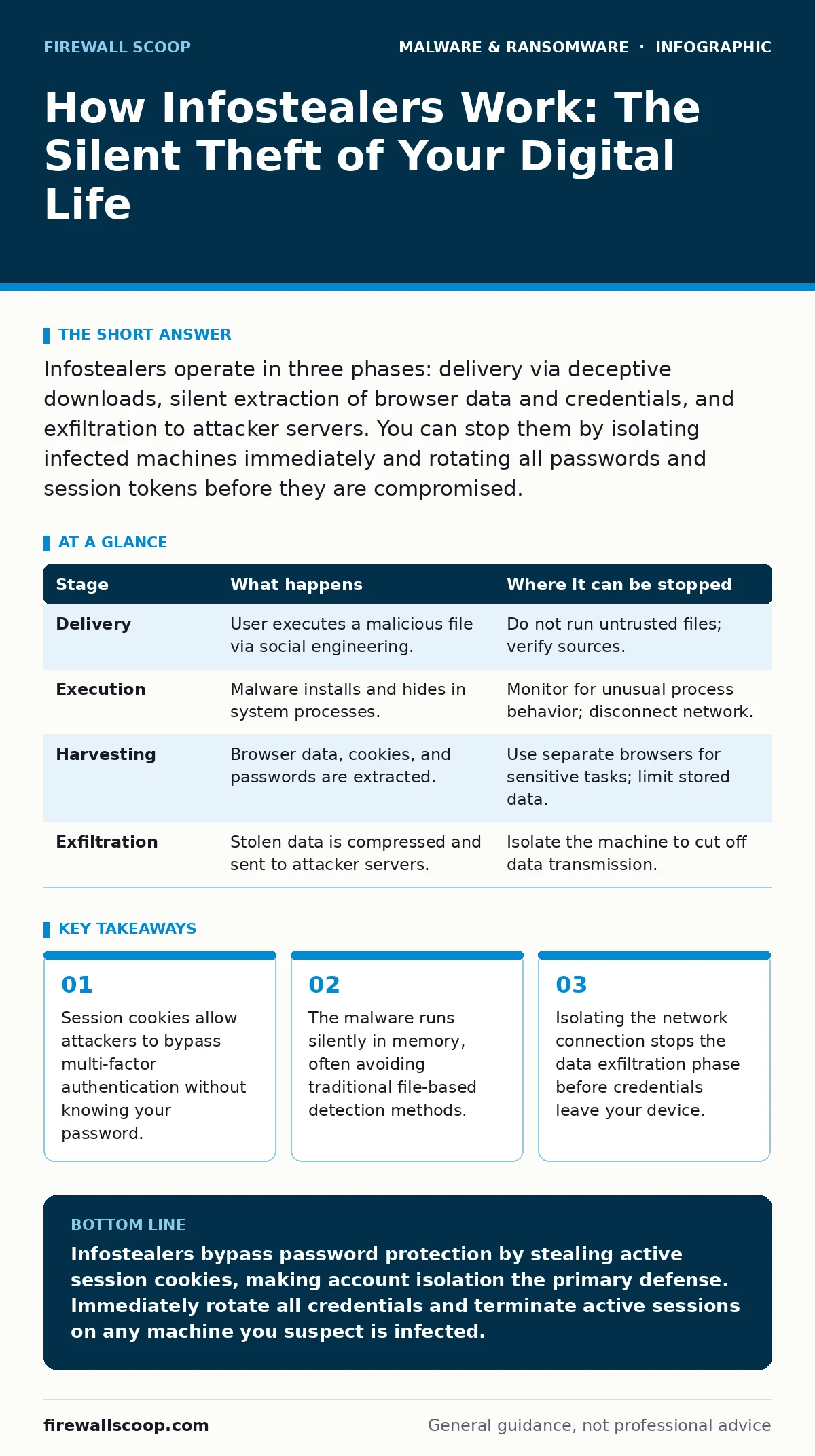
Infostealers operate in three phases: delivery via deceptive downloads, silent extraction of browser data and credentials, and exfiltration to attacker servers. You can stop them by isolating infected machines immediately and rotating all passwords and session tokens before they are compromised.
The Delivery Mechanism
Infostealers rarely arrive through sophisticated zero-day exploits. They rely on human error and social engineering. You might download a cracked application, a fake software update, or a seemingly innocent document. The payload is often hidden inside a legitimate-looking executable or a script that runs when you open a file.
The initial stage depends on your willingness to bypass warnings. If you disable a security prompt to "allow" a download, you are handing the attacker execution rights. This is the first point of failure. If you suspect a file is malicious, do not run it. Isolate it or delete it immediately.
Initial Execution and Persistence
Once the file runs, the malware does not immediately steal data. It first ensures it can survive a reboot. It copies itself to a system directory or modifies startup scripts. This step is critical because you might restart your computer before the theft is complete.
The malware often uses legitimate system tools to hide its activity. This technique, known as living off the land, makes it difficult to distinguish between normal system processes and malicious ones. It may inject code into running processes like the browser or the operating system shell.
You can interrupt this phase by monitoring for unusual process behavior. If a standard system process spawns a network connection it never makes, that is a red flag. Disconnecting from the internet at this stage prevents the malware from receiving further instructions.
The Harvesting Phase
This is the core function of the infostealer. It targets specific folders where browsers and applications store sensitive data. Modern browsers store passwords, credit card details, and autofill data in encrypted databases. The malware extracts these databases and uses the encryption keys stored in your user profile to decrypt them.
This is the non-obvious danger. Many users believe that two-factor authentication protects them. It does not if the attacker steals the active session. The cookie acts as a long-term password. As long as the session is valid, the attacker can act as you.
Exfiltration of Data
After collecting the data, the malware packages it. It compresses the stolen files into a single archive. It then sends this archive to a command and control server. This transmission happens over standard web ports, making it look like normal internet traffic.
The exfiltration is usually small in volume. A few megabytes of data contain years of accumulated credentials. This makes it hard to detect via network monitoring that looks for large data transfers. The malware may wait for a period of inactivity to send the data, further blending in with background traffic.
You can stop this by cutting network access. If you isolate the machine, the data remains trapped on the disk. You can then analyze the disk for the stolen data and remove the malware. However, you must assume the data was already sent if the machine had any prior connectivity.
Account Takeover and Lateral Movement
The attacker receives the stolen data. They use automated tools to sort the credentials by value. Banking accounts, cryptocurrency wallets, and corporate admin logins are prioritized. The attacker then attempts to log in using the stolen session cookies.
Because the session is valid, multi-factor authentication is bypassed. The attacker gains access without triggering login alerts that require a password entry. They may then enable their own two-factor recovery codes, locking you out permanently. This is similar to how remote access trojans operate, but focused on identity theft rather than direct control.
Damage Containment and Recovery
Recovery requires more than just removing the malware. You must assume every credential stored in your browsers is compromised. This includes email, social media, banking, and work accounts. You must reset passwords for all these accounts from a clean, unaffected device.
You should also review account activity for unauthorized changes. Check for new recovery emails or phone numbers added to your profiles. If you use ransomware recovery plans, note that infostealers often precede ransomware deployment. The attacker steals data first, then encrypts files, knowing they can threaten to leak your stolen private data.
Preventing Future Infections
Prevention relies on reducing the attack surface. Use a dedicated browser for sensitive activities. Keep this browser free of extensions and separate from your daily browsing. This limits the amount of data available if an infostealer runs.
Regularly update your operating system and applications. Many infostealers exploit known vulnerabilities in outdated software. Use offline backups to ensure you can restore your system if it becomes infected. Golden images can help you rebuild a clean system quickly, minimizing the recovery time objective.
Be wary of downloads from unofficial sources. Logic bombs and other malware often hide in pirated software. Verify the source of every file you run. If a file requires you to disable security features to install, it is malicious.
Summary of Stages
| Stage | What happens | Where it can be stopped |
|---|---|---|
| Delivery | User executes a malicious file via social engineering. | Do not run untrusted files; verify sources. |
| Execution | Malware installs and hides in system processes. | Monitor for unusual process behavior; disconnect network. |
| Harvesting | Browser data, cookies, and passwords are extracted. | Use separate browsers for sensitive tasks; limit stored data. |
| Exfiltration | Stolen data is compressed and sent to attacker servers. | Isolate the machine to cut off data transmission. |
The key insight is that infostealers target your identity, not your data integrity. They render your security controls useless by stealing the keys to your digital life. By understanding the stages, you can identify the signs of infection earlier and limit the damage.
Key takeaways
- Session cookies allow attackers to bypass multi-factor authentication without knowing your password.
- The malware runs silently in memory, often avoiding traditional file-based detection methods.
- Isolating the network connection stops the data exfiltration phase before credentials leave your device.
Infostealers bypass password protection by stealing active session cookies, making account isolation the primary defense. Immediately rotate all credentials and terminate active sessions on any machine you suspect is infected.
Frequently asked questions
Does changing my password stop an infostealer from accessing my accounts?
No, changing the password does not invalidate existing session cookies. You must also sign out of all active devices to terminate the attacker's session.
Can antivirus software detect infostealers?
Modern antivirus solutions can detect many infostealers, but new variants often evade signature-based detection. Behavioral analysis is more effective than static scanning.
How do I know if my session cookie has been stolen?
Look for account activity you did not perform, such as password reset emails, new device logins, or changes to recovery contact information.
Is two-factor authentication enough to prevent infostealer attacks?
Two-factor authentication protects against password theft but not session hijacking. If the attacker has your active session, they bypass the second factor entirely.
How this guide was produced: written by the Firewall Scoop editorial team with AI assistance, checked against the public references listed below, and reviewed when the facts change. See our editorial policy or report an error.