How Security Bulletins Work: The Hidden Mechanics of Patch Intelligence
Security bulletins are not patches but structured data packets that translate raw code flaws into actionable risk metrics for your specific environment.

A security bulletin is a formal notice from a vendor detailing a vulnerability, its severity, and the required fix. It serves as the bridge between a discovered flaw and your remediation process. You must parse the technical details to determine if the issue affects your specific configuration before applying the associated patch.
The Anatomy of a Vulnerability Notice
You cannot fix what you do not understand. A security bulletin is a structured document released by software vendors to communicate details about a discovered weakness. It is not the repair itself. It is the instruction manual for the repair. The bulletin contains the technical description, the severity rating, and the specific versions of software that are affected.
Most people treat these notices as simple alerts. This is a mistake. The bulletin is a data source. It feeds into your risk-based vulnerability management strategy. Without reading the specific constraints in the bulletin, you might apply a patch that breaks a service or ignore a critical flaw because you assumed it did not affect your setup.
The document serves as the single source of truth for that specific issue. It links the abstract concept of a bug to the concrete reality of your systems. You use it to decide whether to act immediately or schedule the fix for a maintenance window.
Stage 1: Discovery and Classification
The process begins when a researcher or vendor engineer finds a flaw. They analyze the code to determine how the flaw can be exploited. This step is critical because it defines the attack vectors in CVSS. The Common Vulnerability Scoring System provides a standardized way to measure severity.
The vendor assigns a score based on factors like complexity and required privileges. A high score means the flaw is easy to exploit and has severe consequences. A low score might indicate that an attacker needs physical access or specific credentials.
Stage 2: Drafting the Bulletin
Once the flaw is classified, the vendor drafts the bulletin. This document lists the affected products and versions. It also provides a workaround if an immediate patch is not available. The language is technical but precise. It avoids ambiguity to prevent misinterpretation.
The bulletin includes references to external databases. These references allow you to cross-reference the issue with other sources. For example, you might check the National Vulnerability Database to see if other vendors have similar issues. This helps you understand the broader context of the vulnerability.
The draft undergoes internal review. Security teams check for accuracy. Legal teams ensure the information does not expose proprietary details prematurely. This stage can take days or weeks. The delay is necessary to ensure the information is correct.
Stage 3: Publication and Distribution
The vendor publishes the bulletin on their support website. They may also send emails to subscribed customers. The publication date is significant. It marks the start of the clock for remediation. Attackers often monitor these sites for new bulletins.
You should have a process to ingest these bulletins automatically. Manual checking is prone to error and delay. Tools can scrape vendor sites and feed the data into your ticketing system. This ensures that no bulletin is missed.
Stage 4: Assessment and Triage
This is where you apply your knowledge. You read the bulletin to determine if the vulnerability affects your systems. You check the list of affected versions against your current software. You also check the configuration requirements.
Some vulnerabilities only affect systems with specific settings. For instance, a feature must be enabled for the flaw to be exploitable. If you have disabled that feature, you are not at risk. This is a common oversight. Many teams patch everything, wasting time and resources.
You also consider the exposure. Is the affected system accessible from the internet? Is it connected to sensitive data? These factors influence your priority. A server in a DMZ (demilitarized zone) requires faster action than an internal workstation.
See also: WordPress Page Builder Vulnerabilities: What to Know · Software Composition Analysis: Answers to Your Top Questions
Stage 5: Remediation Planning
Once you have assessed the risk, you plan the fix. This involves testing the patch in a non-production environment. You verify that the patch resolves the issue without breaking functionality. This step is vital for patch management.
You also consider dependencies. Some patches require updates to other components. If you ignore these dependencies, the patch may fail. You document the steps required for deployment. This includes rollback procedures in case something goes wrong.
For complex systems, you might need to coordinate with other teams. Network teams may need to adjust firewall rules. Application teams may need to update code. Communication is key to a smooth deployment.
Stage 6: Deployment and Verification
You deploy the patch to your systems. You monitor the deployment for errors. You verify that the vulnerability is closed. This often involves running scans or tests to confirm the fix.
You also update your records. You document which systems were patched and when. This information is useful for audits and future assessments. It also helps you track trends over time.
The Role of Tooling and Analysis
Manual processing of bulletins is inefficient. You need tools to help. Software composition analysis tools can scan your code for known vulnerable components. They can map these components to security bulletins automatically.
These tools reduce the workload. They provide a dashboard view of your exposure. However, they are not perfect. They may generate false positives. You still need to verify the results. Human judgment is essential for interpreting the data.
Integration with Broader Security Practices
Security bulletins are part of a larger ecosystem. They inform your security misconfigurations checks. They also guide your firmware updates strategy. Firmware is often overlooked, but it can contain critical vulnerabilities.
You should integrate bulletin data into your risk model. This allows you to prioritize fixes based on actual risk. It also helps you allocate resources effectively. You focus on the issues that matter most to your business.
The process is continuous. New bulletins are released regularly. You must keep your processes updated. Regular reviews ensure that your approach remains effective. You adapt to new threats and technologies.
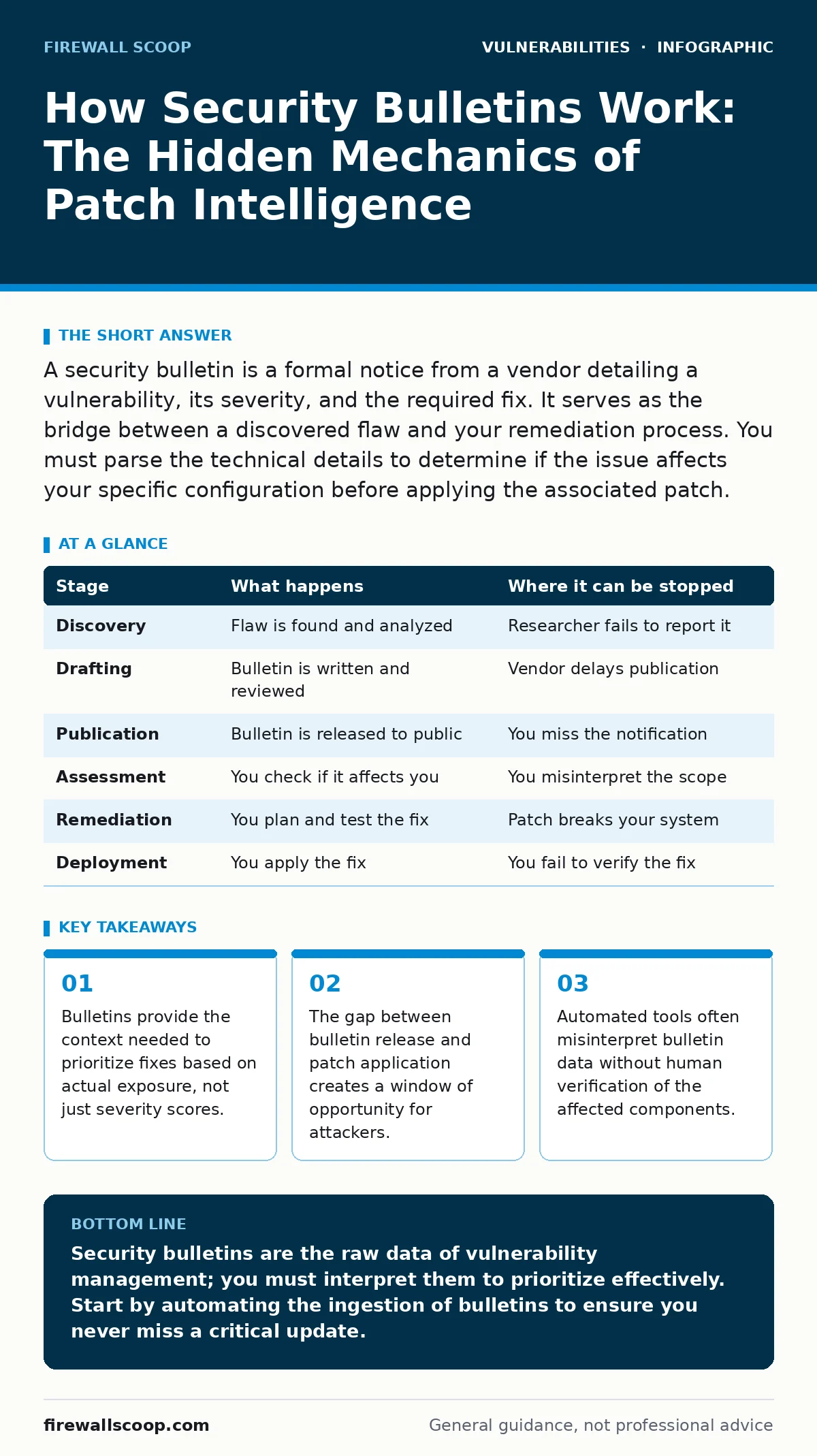
| Stage | What happens | Where it can be stopped |
|---|---|---|
| Discovery | Flaw is found and analyzed | Researcher fails to report it |
| Drafting | Bulletin is written and reviewed | Vendor delays publication |
| Publication | Bulletin is released to public | You miss the notification |
| Assessment | You check if it affects you | You misinterpret the scope |
| Remediation | You plan and test the fix | Patch breaks your system |
| Deployment | You apply the fix | You fail to verify the fix |
Key takeaways
- Bulletins provide the context needed to prioritize fixes based on actual exposure, not just severity scores.
- The gap between bulletin release and patch application creates a window of opportunity for attackers.
- Automated tools often misinterpret bulletin data without human verification of the affected components.
Security bulletins are the raw data of vulnerability management; you must interpret them to prioritize effectively. Start by automating the ingestion of bulletins to ensure you never miss a critical update.
Frequently asked questions
How do I know if a security bulletin applies to my system?
Check the affected versions and configurations listed in the bulletin against your current software inventory and settings.
What is the difference between a security bulletin and a patch?
A bulletin is a document describing the vulnerability and the fix; a patch is the actual code update that resolves the issue.
Can I ignore low-severity security bulletins?
No, because severity scores do not always reflect your specific exposure; a low-severity issue in a critical system can be highly dangerous.
How often are security bulletins released?
Vendors release them as soon as they have a verified fix, which can be daily, weekly, or monthly depending on the vendor and the severity.
How this guide was produced: written by the Firewall Scoop editorial team with AI assistance, checked against the public references listed below, and reviewed when the facts change. See our editorial policy or report an error.