How Cloud Workload Protection Works: Mechanics and Limits
Cloud workload protection agents intercept system calls at the kernel level to block exploitation before the operating system processes the request, hiding the defense from the attacker.
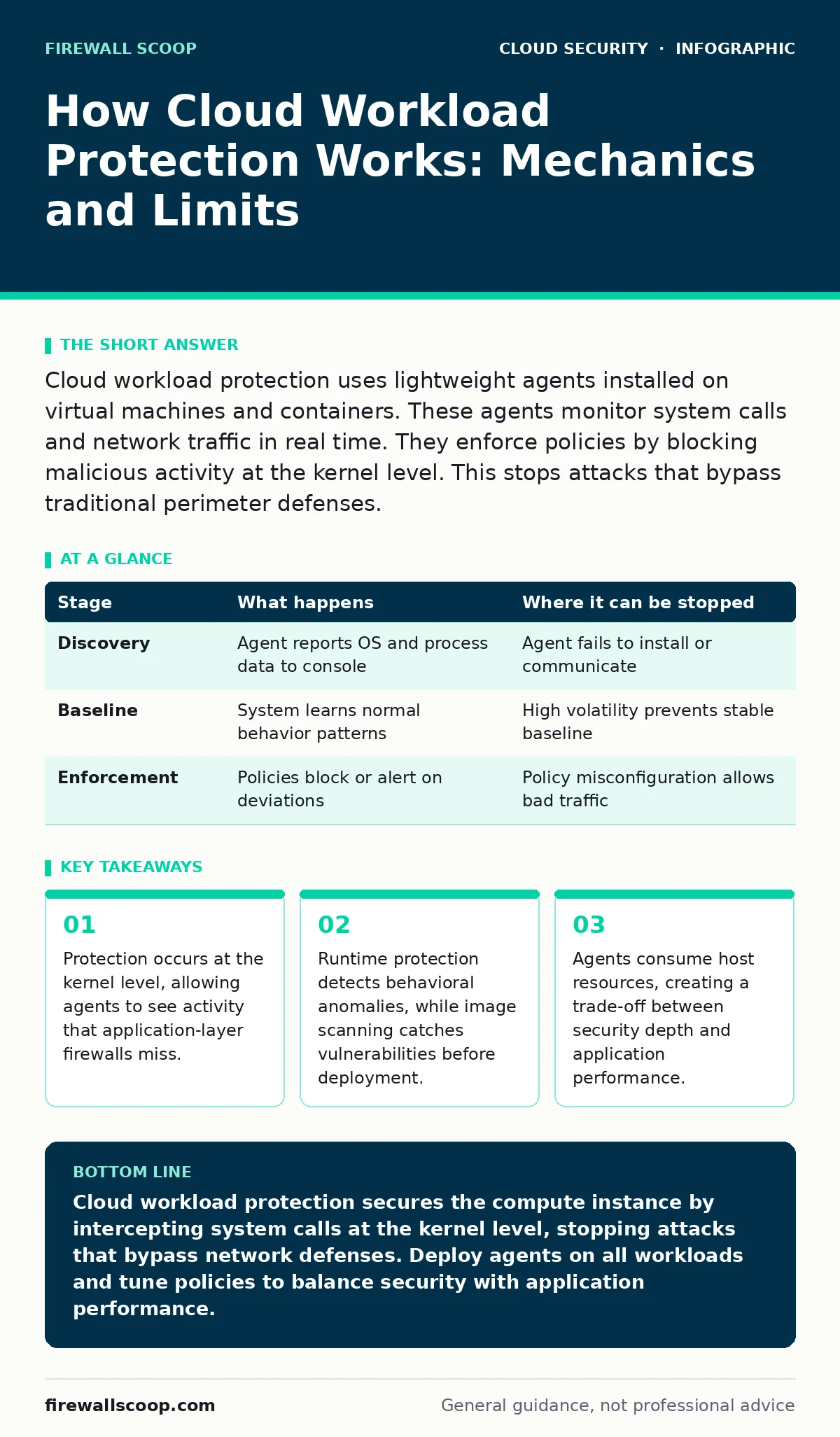
Cloud workload protection uses lightweight agents installed on virtual machines and containers. These agents monitor system calls and network traffic in real time. They enforce policies by blocking malicious activity at the kernel level. This stops attacks that bypass traditional perimeter defenses.
The Shift from Perimeter to Host
Traditional network security relies on blocking traffic at the edge. This approach fails in cloud environments where workloads move dynamically. You cannot secure a resource that changes IP addresses every few minutes. Cloud workload protection platforms (CWPP) address this by securing the compute instance itself. The defense travels with the workload, regardless of its location.
This shift requires a different mental model. You stop thinking about blocking IPs and start thinking about securing the process. The agent sits inside the operating system. It sees every action the application takes. This visibility allows for precise control that perimeter tools cannot match.
### Stage 1: Asset Discovery and Inventory
The first step is knowing what you are protecting. Cloud environments change rapidly. New instances spin up and down automatically. Manual inventory is impossible at scale. The CWPP agent registers with the central management console upon installation. It reports the operating system version, installed software, and running processes.
This data forms the baseline of normal behavior. Without an accurate inventory, you cannot define what is anomalous. The agent also identifies the cloud provider and region. This context helps in applying specific compliance rules. If an asset is not discovered, it is not protected.
| Stage | What happens | Where it can be stopped |
|---|---|---|
| Discovery | Agent reports OS and process data to console | Agent fails to install or communicate |
| Baseline | System learns normal behavior patterns | High volatility prevents stable baseline |
| Enforcement | Policies block or alert on deviations | Policy misconfiguration allows bad traffic |
### Stage 2: Image Scanning and Pre-Deployment Checks
Before a workload runs, its image must be safe. This stage happens during the build process. The platform scans container images and virtual machine templates for known vulnerabilities. It checks for misconfigurations in the code. This prevents vulnerable software from ever reaching production.
This is a passive form of protection. It reduces the attack surface before the workload is live. However, it does not protect against runtime attacks. Zero-day exploits bypass static scanning. You must combine this with runtime protection for full coverage. See insecure container images for details on scanning strategies.
### Stage 3: Runtime Monitoring and System Call Interception
This is the core mechanism of cloud workload protection. The agent hooks into the operating system kernel. It intercepts system calls before the OS processes them. When an application requests a file read or network connection, the agent checks it against policy. If the action is malicious, the agent blocks it immediately.
This happens in microseconds. The user and the application do not notice the intervention. The attacker sees a failed action but not why. This opacity is a key advantage. It prevents attackers from mapping your defenses. The agent logs the attempt for later analysis.
### Stage 4: Policy Enforcement and Microsegmentation
Policies define what is allowed and what is blocked. These rules are applied at the host level. You can restrict outbound connections to specific domains. You can prevent certain processes from accessing sensitive files. This is a form of microsegmentation. It limits the lateral movement of an attacker.
If one workload is compromised, it cannot easily talk to others. The agent enforces these rules locally. This reduces reliance on network security groups. It provides an extra layer of defense. Even if the network rules are misconfigured, the host agent still blocks unauthorized traffic. See microsegmentation for deeper network controls.
See also: Kubernetes Admission Controllers: Enforce Policy Before Workloads Start · Firewalls in Cloud Computing: How They Work and Where They Fail
### Stage 5: Threat Detection and Anomaly Analysis
Not all threats are known. Some attacks use valid tools in invalid ways. The agent uses behavioral analysis to detect these anomalies. It looks for unusual process chains or unexpected network patterns. Machine learning models help identify deviations from the baseline. This catches novel attacks that signature-based tools miss.
Detection is not the same as prevention. The agent may alert you to a suspicious activity without blocking it. This requires tuning to reduce false positives. If you block too much, you break applications. If you block too little, you miss threats. Balance is key. See CI/CD pipeline attacks for context on supply chain risks.
### Stage 6: Response and Remediation
When a threat is confirmed, the agent can take action. It can isolate the workload from the network. It can kill the malicious process. It can capture a memory dump for forensics. These actions happen automatically based on predefined playbooks. Speed is critical in cloud environments. Manual response is too slow.
Automated response reduces the window of exposure. It contains the blast radius. However, automation carries risk. A false positive can take down a production service. You must test response actions in non-production environments first. Validate that the remediation steps do not cause outages.
The Limits of Cloud Workload Protection
CWPP is not a silver bullet. It protects the compute layer but not the identity layer. If an attacker has valid credentials, the agent may allow their actions. They appear as a legitimate user. You must combine CWPP with identity governance. See cloud privilege escalation for risks related to access rights.
Performance is another limit. The agent consumes CPU and memory. In resource-constrained environments, this can impact application speed. You must monitor agent overhead. Adjust sampling rates to balance security and performance. Heavy monitoring can slow down high-throughput applications.
Visibility into encrypted traffic is also limited. If the workload terminates TLS, the agent can see the payload. If the traffic remains encrypted, the agent sees only metadata. You need additional tools for full visibility. See secure access service edge (SASE) for network-level inspection.
Integrating with Broader Security Strategies
CWPP works best as part of a layered defense. It complements network security and identity management. It does not replace them. You need to correlate data from multiple sources. A threat detected by the agent may have originated from a compromised identity.
Integration with SIEM and SOAR platforms is vital. This allows for centralized monitoring and automated response. You can trigger broader actions based on host-level alerts. For example, revoking access tokens when a host is compromised. This creates a cohesive security posture. See cloud access security brokers (CASB) for data-centric controls.
Conclusion of Mechanics
Understanding the mechanics of CWPP helps you deploy it effectively. You know where the protection happens and where it stops. You know the trade-offs between visibility and performance. This knowledge allows you to design a resilient architecture. You protect the workload without hindering innovation.
The agent is your last line of defense at the host. It catches what the network misses. It enforces policies at the point of execution. Use it wisely. Combine it with other controls for comprehensive security. See zero trust network access for identity-centric security models.
Key takeaways
- Protection occurs at the kernel level, allowing agents to see activity that application-layer firewalls miss.
- Runtime protection detects behavioral anomalies, while image scanning catches vulnerabilities before deployment.
- Agents consume host resources, creating a trade-off between security depth and application performance.
Cloud workload protection secures the compute instance by intercepting system calls at the kernel level, stopping attacks that bypass network defenses. Deploy agents on all workloads and tune policies to balance security with application performance.
Frequently asked questions
Does CWPP replace a traditional firewall?
No, CWPP secures the host while firewalls secure the network. They serve different layers of defense and should be used together for complete protection.
Can CWPP protect serverless functions?
CWPP primarily protects VMs and containers. Serverless functions require different security controls, often focusing on code and configuration rather than runtime agents.
How much performance overhead does an agent add?
Overhead varies by workload and configuration. Typically it is minimal, but high-throughput applications may see slight latency increases. Monitor resource usage closely.
Is CWPP effective against insider threats?
CWPP can detect anomalous behavior from insiders, but it cannot stop authorized actions. You need identity governance and access reviews to mitigate insider risk effectively.
How this guide was produced: written by the Firewall Scoop editorial team with AI assistance, checked against the public references listed below, and reviewed when the facts change. See our editorial policy or report an error.