Firewalls in Cloud Computing: How They Work and Where They Fail
Cloud firewalls filter traffic at the network edge, but they cannot inspect encrypted payloads or prevent lateral movement once an attacker breaches the perimeter.

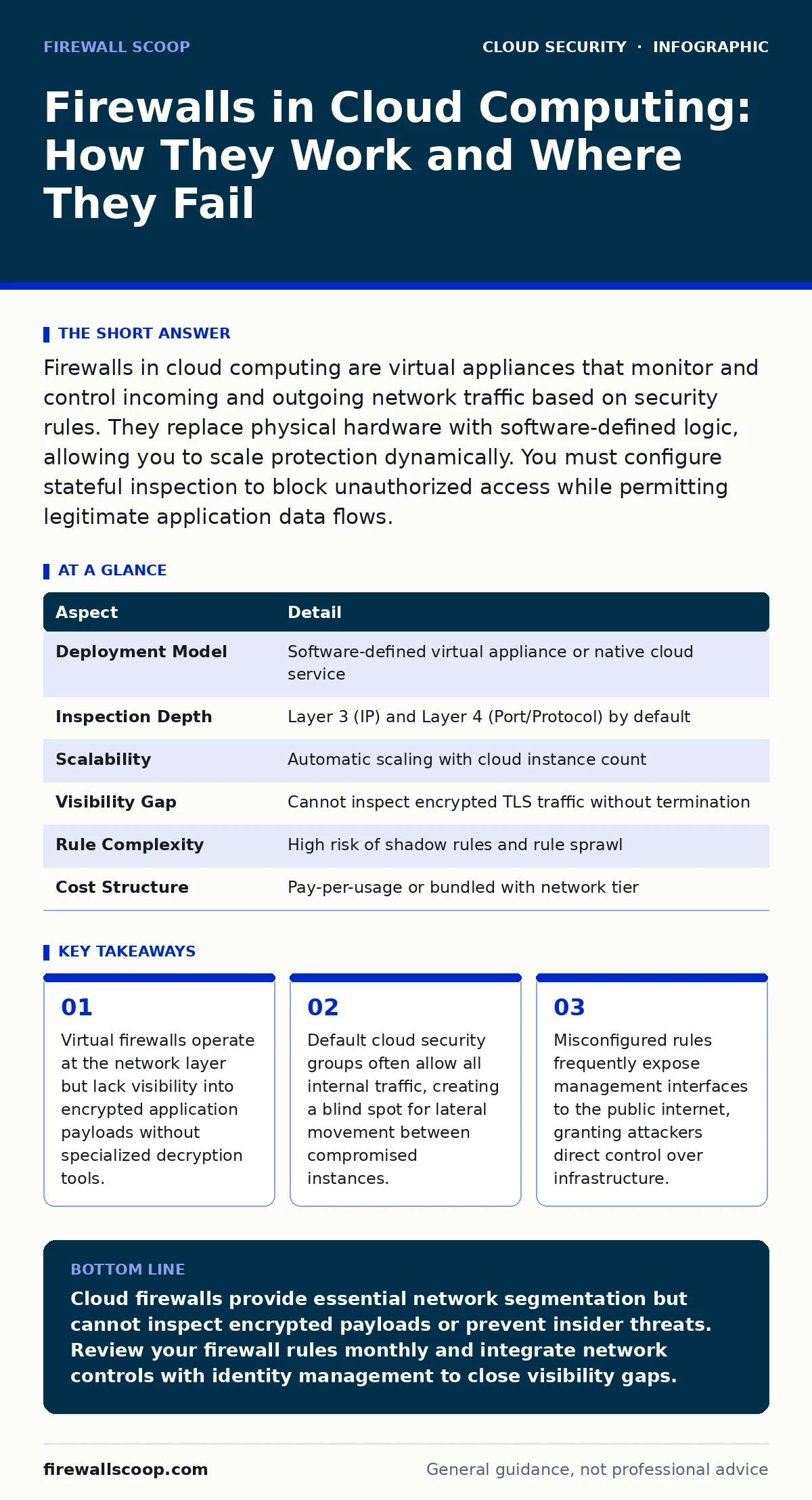
Firewalls in cloud computing are virtual appliances that monitor and control incoming and outgoing network traffic based on security rules. They replace physical hardware with software-defined logic, allowing you to scale protection dynamically. You must configure stateful inspection to block unauthorized access while permitting legitimate application data flows.
Understanding the Virtual Perimeter
Imagine a physical building with a single guarded entrance. The guard checks IDs and denies entry to unauthorized visitors. This is the traditional model of network security. Now imagine that building dissolves into a swarm of drones flying across a city. There is no single door. There is no fixed wall. This is the reality of cloud infrastructure.
Firewalls in cloud computing function as software-defined barriers rather than hardware boxes. They sit at the boundary between your cloud resources and the external network. These virtual appliances inspect packets of data as they enter or leave your virtual network. They compare each packet against a set of rules you define. If the packet matches an allow rule, it passes through. If it matches a deny rule, the firewall drops it.
This mechanism provides a baseline of protection. It stops unsolicited traffic from reaching your servers. It prevents casual scans from discovering open ports. It enforces a policy that only specific services can accept connections from the internet. However, this protection is purely structural. It does not verify the intent of the traffic. It does not know if an allowed connection is carrying malware.
| Aspect | Detail |
|---|---|
| Deployment Model | Software-defined virtual appliance or native cloud service |
| Inspection Depth | Layer 3 (IP) and Layer 4 (Port/Protocol) by default |
| Scalability | Automatic scaling with cloud instance count |
| Visibility Gap | Cannot inspect encrypted TLS traffic without termination |
| Rule Complexity | High risk of shadow rules and rule sprawl |
| Cost Structure | Pay-per-usage or bundled with network tier |
How Virtual Appliances Filter Traffic
The core function of a cloud firewall is stateful packet inspection. Stateful means the firewall remembers the context of active connections. It tracks the handshake that starts a session. It ensures that return traffic matches the initial request. This prevents spoofed packets from tricking the system.
You define rules using source IP addresses, destination IP addresses, and port numbers. A typical rule might allow traffic from any source to port 443 on your web server. Port 443 is the standard port for HTTPS. This rule permits web browsing traffic. It blocks all other traffic to that server by default.
The firewall evaluates rules in a specific order. It processes them from top to bottom. The first matching rule determines the action. This order matters significantly. A broad allow rule placed above a specific deny rule will render the deny rule useless. You must structure your rules with precision.
The Hidden Cost of Encryption
Encrypted traffic presents a unique challenge for firewalls in cloud computing. Most modern web traffic uses TLS encryption. The firewall sees only the encrypted envelope. It cannot see the content inside. It cannot detect malware hidden in a secure stream.
To inspect this traffic, you must terminate the encryption at the firewall. The firewall decrypts the stream, inspects the payload, and then re-encrypts it for delivery. This process adds latency. It increases the computational load on the firewall. It also requires you to manage cryptographic certificates securely.
Many organizations skip this step to save performance. They allow encrypted traffic to pass through uninspected. This creates a blind spot. Attackers use encryption to hide command-and-control communications. They use it to exfiltrate data without detection. You must decide whether visibility or performance is more critical for your specific workload.
Who Bears the Responsibility
Cloud security operates on a shared responsibility model. The cloud provider secures the underlying infrastructure. They ensure the physical hardware and the virtualization layer are safe. You secure everything you put on top of that infrastructure. This includes your firewalls, your operating systems, and your applications.
This division of labor often causes confusion. Users assume the provider protects their data. The provider assumes the user configures their network correctly. When a breach occurs, both parties point to the other. You must understand where your control ends and the provider's begins.
Your team is responsible for writing the firewall rules. You are responsible for updating them as your application changes. You are responsible for monitoring logs for suspicious activity. The provider gives you the tools. You must wield them with discipline.
What People Usually Get Wrong
Most security failures stem from misconfiguration, not software flaws. Teams often create overly permissive rules to avoid blocking legitimate traffic. They use "allow all" rules as a temporary fix and never remove them. These rules accumulate over time. They become a shadow infrastructure that no one understands.
Another common error is relying solely on the firewall. Teams treat the firewall as the only line of defense. They ignore application-level security. They ignore identity management. When an attacker bypasses the firewall using a valid credential, there are no other controls to stop them.
You must integrate firewall policies with broader security practices. Review your rules regularly. Remove unused rules. Document the purpose of each rule. Treat your firewall configuration as code. Version control your rules. Test changes in a staging environment before applying them to production.
See also: Kubernetes Admission Controllers: Enforce Policy Before Workloads Start · What Does DevSecOps Mean: Integrating Security Into The Software Pipeline
Integrating with Cloud Workload Protection
Firewalls protect the network perimeter. They do not protect the individual servers inside. You need additional layers of defense. Cloud workload protection platforms monitor the operating system and applications directly. They detect anomalies that network traffic alone cannot reveal.
Imagine a server that receives a large file transfer. The firewall allows the traffic because it comes from a trusted IP. The workload protection agent sees that the file is being modified in an unusual way. It flags the activity as suspicious. This layered approach catches threats that slip past the network layer.
You should also consider secure access service edge (SASE) for distributed teams. SASE combines networking and security functions into a single cloud service. It provides consistent security policies regardless of where users connect. This reduces the complexity of managing multiple firewall appliances.
Managing Multi-Cloud Security
Organizations often use multiple cloud providers. Each provider has its own firewall implementation. Each has its own rule syntax. Each has its own logging format. Managing these disparate systems creates operational friction.
You need a unified view of your security posture. Tools that abstract the underlying differences help. They allow you to define policies once and deploy them everywhere. This consistency reduces the risk of configuration drift. It ensures that a rule change in one cloud is mirrored in others.
Data residency requirements also impact firewall placement. You may need to keep certain traffic within specific geographic regions. Firewalls help enforce these boundaries. They drop traffic that attempts to cross regional lines. You must map your compliance requirements to your network architecture.
Strengthening Identity and Access
Network controls are not enough. You must verify who is accessing your resources. Federated identity allows users to log in using their existing credentials. It centralizes authentication and authorization. This reduces the attack surface by eliminating local password databases.
Kubernetes RBAC is critical for containerized workloads. It defines who can do what within a cluster. Even if an attacker bypasses the network firewall, RBAC limits their ability to interact with other containers. You must apply the principle of least privilege. Grant only the permissions necessary for each role.
CI/CD pipeline attacks are a growing threat. Attackers inject malicious code during the build process. This code bypasses runtime security controls. You must secure your build pipelines. Verify the integrity of every artifact before deployment. Treat your pipeline as a critical asset.
Key takeaways
- Virtual firewalls operate at the network layer but lack visibility into encrypted application payloads without specialized decryption tools.
- Default cloud security groups often allow all internal traffic, creating a blind spot for lateral movement between compromised instances.
- Misconfigured rules frequently expose management interfaces to the public internet, granting attackers direct control over infrastructure.
Cloud firewalls provide essential network segmentation but cannot inspect encrypted payloads or prevent insider threats. Review your firewall rules monthly and integrate network controls with identity management to close visibility gaps.
Frequently asked questions
Do cloud firewalls replace traditional hardware firewalls?
Yes, for workloads running in the cloud. Virtual firewalls offer greater flexibility and scalability. However, you may still need hardware firewalls for on-premises data centers that connect to the cloud.
How often should I update my firewall rules?
You should review rules whenever your application architecture changes. Regular quarterly audits are recommended to remove unused rules and detect configuration drift.
Can a firewall stop a DDoS attack?
Basic firewalls can block simple volumetric attacks. However, sophisticated DDoS attacks require specialized mitigation services. These services absorb traffic before it reaches your firewall.
Is it safe to allow all internal traffic?
No. Allowing all internal traffic enables lateral movement. If one server is compromised, the attacker can move freely to others. Segment your network and restrict internal communications.
How this guide was produced: written by the Firewall Scoop editorial team with AI assistance, checked against the public references listed below, and reviewed when the facts change. See our editorial policy or report an error.