DFIR Training for Small Business Threat Readiness
Small teams that practice live memory capture preserve critical breach evidence that standard automated back-ups silently wipe away during an incident.
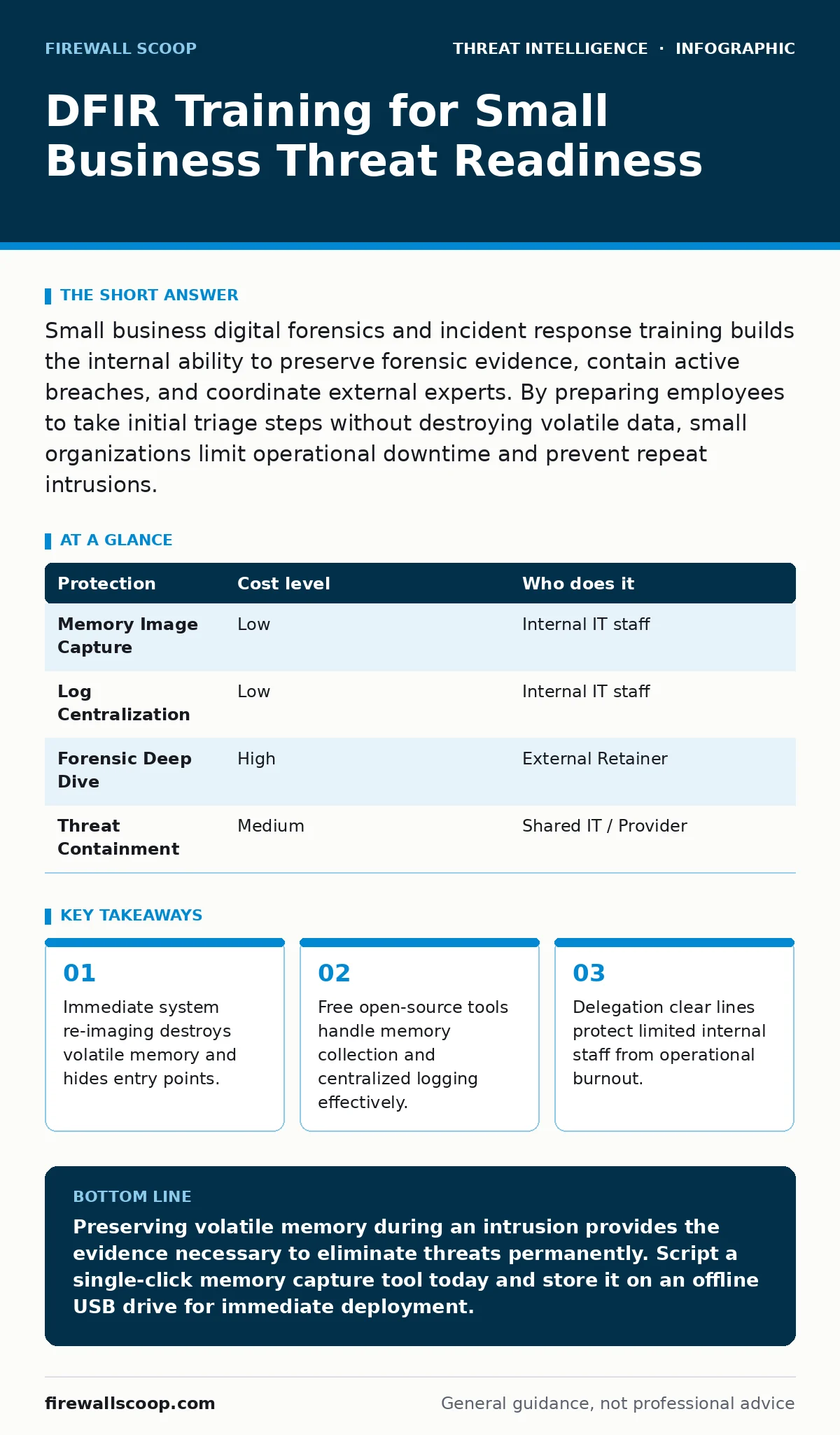
Small business digital forensics and incident response training builds the internal ability to preserve forensic evidence, contain active breaches, and coordinate external experts. By preparing employees to take initial triage steps without destroying volatile data, small organizations limit operational downtime and prevent repeat intrusions.
Why Small Businesses Need Incident Response Triage
Small businesses face severe operational outages when cyber security incidents occur, making rapid digital forensics and incident response (DFIR) skills essential. DFIR is the practice of investigating, containing, and recovering from digital security breaches while preserving legal evidence. Most small firms mistakenly rely entirely on external providers for triage, assuming local staff need no technical response skills.
When an intrusion happens, internal staff often react by pulling network cables or powering down machines. Turning off a computer wipes volatile memory (RAM), which contains active encryption keys, running processes, and network connections. Training local staff to run basic memory capture scripts saves evidence before external investigators arrive.
Without basic local response capabilities, organizations risk wiping critical details about attacker persistence techniques, leaving the root vulnerability unpatched. Practicing fundamental evidence collection ensures that your team hands clean, actionable details to outside forensic experts.
The High Cost of Knee-Jerk Computer Re-Imaging
Wiping a machine immediately after detecting an infection seems like a fast remedy, but it frequently causes recurring breaches. Re-imaging removes the immediate malware binaries without revealing how the intruder gained access, escalated privileges, or established remote command channels across your network.
Intruders often establish secondary access paths using lateral movement to compromise adjacent domain controllers or cloud tenants. Re-imaging a single workstation gives executives a false sense of security while hidden backdoors remain active elsewhere.
Local teams must learn to isolate suspicious endpoints at the network layer rather than wiping operating systems. Host-based firewalls or network switch port isolation isolates infected nodes while leaving power running. This approach preserves the operating system state, permitting deep analysis of system logs and memory dumps.
Building Low-Cost Forensic Readiness with Standard Tools
Effective incident response training does not require expensive software suites or dedicated security operations centers. Standard operating systems contain built-in command-line tools capable of capturing process lists, open network sockets, and system event logs.
Free public frameworks like the MITRE ATT&CK matrix help small teams structure their internal training scenarios without high costs. Combining standard operating system utilities with open-source log aggregation tools creates a practical baseline for monitoring environment health.
| Protection | Cost level | Who does it |
|---|---|---|
| Memory Image Capture | Low | Internal IT staff |
| Log Centralization | Low | Internal IT staff |
| Forensic Deep Dive | High | External Retainer |
| Threat Containment | Medium | Shared IT / Provider |
Internal teams can deploy basic low-interaction honeypots to trigger early alerts when unauthorized scanners traverse local network segments. Training staff to recognize alerts from these simple tools builds confidence without overwhelming them with false positives.
Deciding What Tasks to Keep and What to Delegate
Small organizations cannot maintain full-time forensic analysts, making clear delegation boundaries mandatory for efficient operations. Internal staff should master evidence preservation, initial containment, and communication management during a crisis.
Complex tasks like reversed-engineered binary analysis, file system timeline reconstruction, and deep network packet decryption belong with third-party incident response firms. Establishing a pre-funded retainer agreement ensures expert analysts join the investigation without administrative delays.
- Internal staff identify anomalies, capture live memory, and isolate affected hardware nodes.
- Internal staff notify management and launch manual contingency workflows to maintain business operations.
- Third-party retainer teams receive preserved memory files, analyze the root cause, and purge persistent backdoors.
Proactive threat hunting remains an advanced discipline best left to specialized third parties or dedicated security tools. Your internal objective is speed, containment, and accurate evidence preservation.
Essential Questions for Your Managed Service Provider
Managed service providers (MSPs) often oversee routine IT operations for smaller firms, but their responsibilities during an incident require explicit contractual boundaries. Asking precise technical questions prevents dangerous assumptions when an intrusion occurs.
- Does our contract cover live memory collection, or do you automatically re-image infected workstations?
- How many days of audit logs are stored in an off-site, immutable location?
- What is your guaranteed response time when we report a confirmed system compromise?
- Do you provide raw forensic images to our team upon request during an active investigation?
- Will you isolate compromised cloud accounts across our entire tenant within one hour of notification?
Clarifying these points ahead of time ensures your provider operates as an extension of your forensic strategy rather than a bottleneck. Request written confirmation of log retention schedules to ensure data exists when external forensic investigators request it.
See also: Audit Logging Best Practices: Secure Logs Against Tampering · Spear Phishing Prevention Checklist for Secure Operations
Designing Realistic Tabletop Exercises for Staff
Conducting brief, quarterly scenario walk-throughs keeps emergency protocols fresh in the minds of non-technical workers and IT staff alike. A tabletop exercise tests communication pathways, escalation procedures, and decision-making authority under simulated pressure.
Run through hypothetical situations where cloud management keys leak or ransomware encrypts localized storage shares. Evaluate how fast team members identify who holds authority to disconnect internet connections or execute legal disclosures.
Simulated drills reveal missing passwords, outdated phone lists, and unbacked-up encryption keys before a genuine crisis occurs. Documenting the findings from every exercise creates actionable internal documentation that matures your security posture over time.
Key takeaways
- Immediate system re-imaging destroys volatile memory and hides entry points.
- Free open-source tools handle memory collection and centralized logging effectively.
- Delegation clear lines protect limited internal staff from operational burnout.
Preserving volatile memory during an intrusion provides the evidence necessary to eliminate threats permanently. Script a single-click memory capture tool today and store it on an offline USB drive for immediate deployment.
Frequently asked questions
What is the first thing a small business should do when discovering a breach?
Isolate the affected machine from the network by pulling the Ethernet cable or disabling Wi-Fi, but leave the power turned on to preserve volatile memory.
How long should a small business keep system event logs for forensic purposes?
Retain centralized event logs for at least 90 days online for immediate searchability, and archive them in immutable storage for 365 days.
Can a small business do digital forensics without an expensive retainer contract?
Basic evidence capture and initial containment can be handled internally using free tools, but complex malware analysis requires specialized third-party expertise.
Why is shutting down a computer during a cyber attack considered a mistake?
Powering down a computer wipes the volatile RAM, destroying active network connections, encryption keys, and running malware processes needed for analysis.
How this guide was produced: written by the Firewall Scoop editorial team with AI assistance, checked against the public references listed below, and reviewed when the facts change. See our editorial policy or report an error.