Typosquatting Warning Signs: How to Spot Fake Domains
Typosquatting relies on visual confusion and human error, making subtle character swaps the primary vector for credential theft and malware distribution.

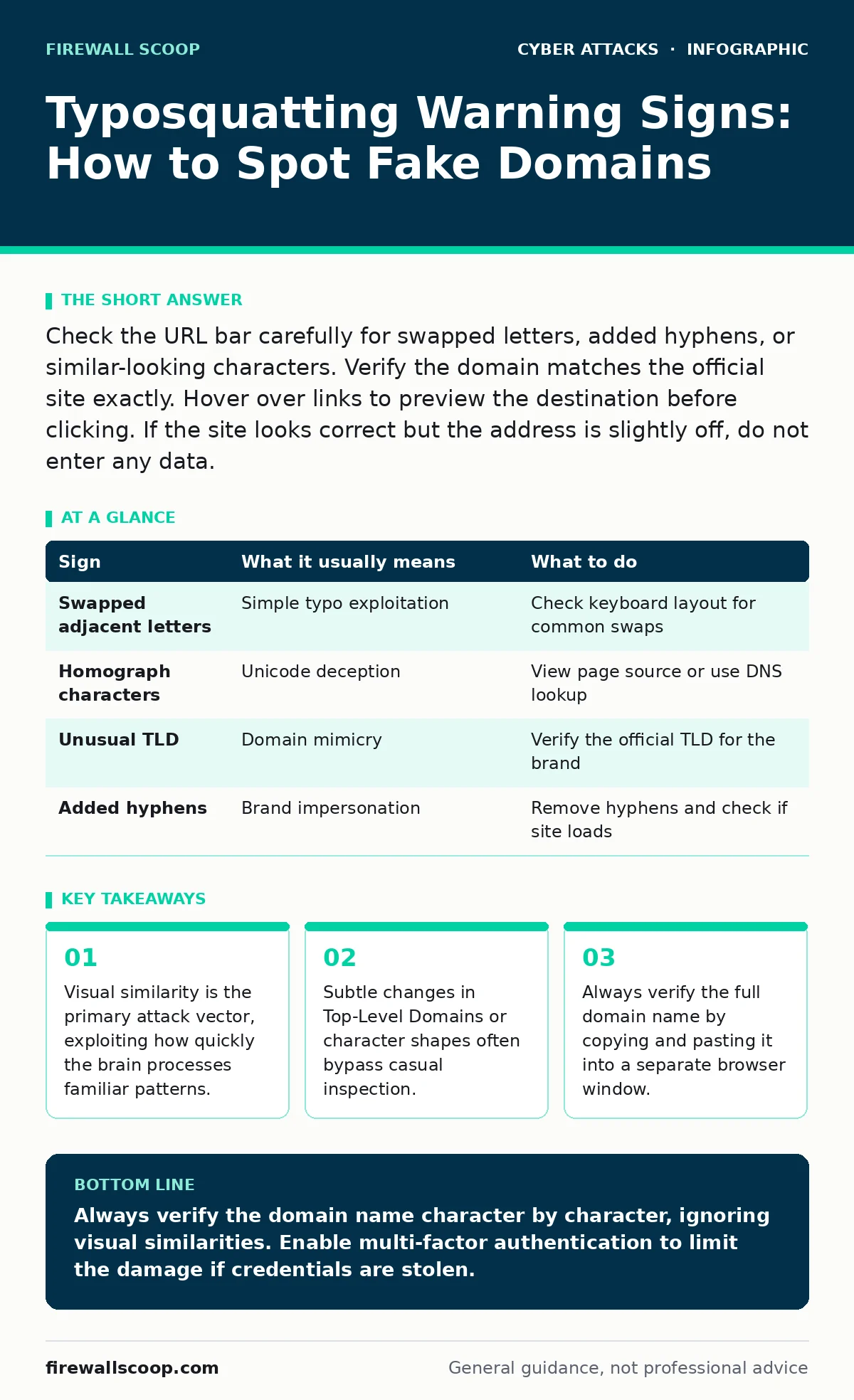
Check the URL bar carefully for swapped letters, added hyphens, or similar-looking characters. Verify the domain matches the official site exactly. Hover over links to preview the destination before clicking. If the site looks correct but the address is slightly off, do not enter any data.
The Anatomy of a Lookalike Domain
Typosquatting exploits the natural tendency of users to skim rather than read. Attackers register domain names that closely resemble legitimate sites. They rely on the fact that you expect the address to be correct. This expectation blinds you to small discrepancies. The goal is to harvest credentials or install malware before you realize the deception.
Imagine typing a banking portal and missing a single swapped letter. The site loads with your familiar logo and layout. You enter your username and password. The data goes to an attacker, not the bank. This works because the visual difference is minimal.
Signs You Notice First
The most obvious signs involve clear spelling errors. These are easy to spot if you look closely.
- Swapped Characters: Letters next to each other on the keyboard are exchanged. For example, "goggle" instead of "google".
- Missing or Extra Letters: A letter is dropped or duplicated. "paypa1" or "amaz0n" uses numbers that look like letters.
- Added Hyphens or Dots: Legitimate brands rarely use hyphens in their main domain. "my-bank.com" is suspicious if the real site is "mybank.com".
These errors trigger a basic alert in most users. However, attackers know this. They move to more subtle techniques.
Signs That Are Easy to Miss
Subtle typosquatting hides in plain sight. These techniques exploit font rendering and linguistic quirks.
- Homograph Attacks: These use characters from different scripts that look identical. Cyrillic "а" looks like Latin "a". Your browser displays them identically, but the domain is different.
- Subtle TLD Changes: The Top-Level Domain is the suffix like .com or .net. An attacker might use .co instead of .com. The difference is small but changes the destination entirely.
- Brand Name Variations: Adding "secure" or "login" as a subdomain. "login.realbank.com" might be fake, while "realbank.com" is real.
These signs require active inspection. Passive reading is not enough. You must compare the address to what you expect.
The Mechanics of Deception
Typosquatting is not just about typos. It is about prediction. Attackers use algorithms to generate likely misspellings. They register hundreds of variations. They wait for you to make a mistake.
This connects to credential stuffing, where attackers use stolen passwords on multiple sites. If they trick you into logging into a fake site, they get fresh credentials. They can then try those credentials elsewhere.
The visual similarity is the key. The browser does not warn you because the domain is technically valid. It is registered and has a certificate. It just belongs to an attacker.
Verifying the Destination
When you suspect a typosquatting attempt, do not click anything. Use these steps to verify.
- Hover Over Links: Move your mouse over the link without clicking. The true URL appears in the status bar or tooltip.
- Copy and Paste: Copy the URL from the address bar. Paste it into a text editor. Look closely at each character.
- Manual Entry: Type the known correct URL manually. Do not use bookmarks if they might have been tampered with.
This process breaks the flow of the attack. It forces you to slow down and inspect.
| Sign | What it usually means | What to do |
|---|---|---|
| Swapped adjacent letters | Simple typo exploitation | Check keyboard layout for common swaps |
| Homograph characters | Unicode deception | View page source or use DNS lookup |
| Unusual TLD | Domain mimicry | Verify the official TLD for the brand |
| Added hyphens | Brand impersonation | Remove hyphens and check if site loads |
The Hidden Cost of Trust
We trust browsers to protect us. They do not. Browsers display what the server sends. If the server sends a valid certificate, the browser shows a lock icon. This does not mean the site is legitimate. It only means the connection is encrypted.
This is where DNS spoofing differs. DNS spoofing corrupts the resolution process. Typosquatting uses valid resolution. The domain exists. It is just not the one you wanted.
You must not rely on the lock icon. You must rely on the domain name. The lock icon protects against eavesdropping, not identity theft.
Responding to Suspicious Sites
If you suspect a site is fake, stop. Do not enter data. Close the tab.
Report the site to the relevant authorities. Many browsers have reporting tools. You can also report it to the domain registrar.
If you already entered data, change your passwords immediately. Use a different device if possible. Enable multi-factor authentication. This adds a layer of security that stolen passwords cannot bypass.
This relates to CEO fraud, where attackers use social engineering. Typosquatting is the technical layer. The psychological layer is the same. They want you to act quickly without thinking.
Building Defensive Habits
Make verification a habit. Check the URL every time you log in. Do not assume the bookmark is safe. Bookmarks can be modified by malware.
Use password managers. They auto-fill only for known, verified sites. If the site is fake, the password manager will not fill the credentials. This is a strong indicator of a problem.
This complements SPF records, which protect email. Typosquatting often starts with a phishing email. If the email is verified, you are safer. But the link inside might still be fake.
Stay calm. Do not panic. Verify. Then act.
Key takeaways
- Visual similarity is the primary attack vector, exploiting how quickly the brain processes familiar patterns.
- Subtle changes in Top-Level Domains or character shapes often bypass casual inspection.
- Always verify the full domain name by copying and pasting it into a separate browser window.
Always verify the domain name character by character, ignoring visual similarities. Enable multi-factor authentication to limit the damage if credentials are stolen.
Frequently asked questions
How do I know if a domain is a homograph attack?
Copy the URL and paste it into a plain text editor. Look for non-Latin characters that resemble standard letters.
Can a password manager detect typosquatting?
Yes, most password managers will not auto-fill credentials for domains that do not exactly match the saved entry.
Does HTTPS protect against typosquatting?
No, HTTPS only encrypts the connection. It does not verify the identity of the website owner.
Should I report typosquatting domains?
Yes, report them to the domain registrar and your browser vendor to help block them for others.
How this guide was produced: written by the Firewall Scoop editorial team with AI assistance, checked against the public references listed below, and reviewed when the facts change. See our editorial policy or report an error.